Permissions
Though we refer to them as "permissions" in this document, this concept is interchangeable with that of OAuth scopes. If you're unfamiliar with scopes, see oauth.com's article as a starting point.
When you create a new developer application, you must select the permissions required by your application. You should choose the smallest set necessary for your application to function properly – for example, if you are writing an application which creates Inbox Leads, you may not need access to records like Matters.
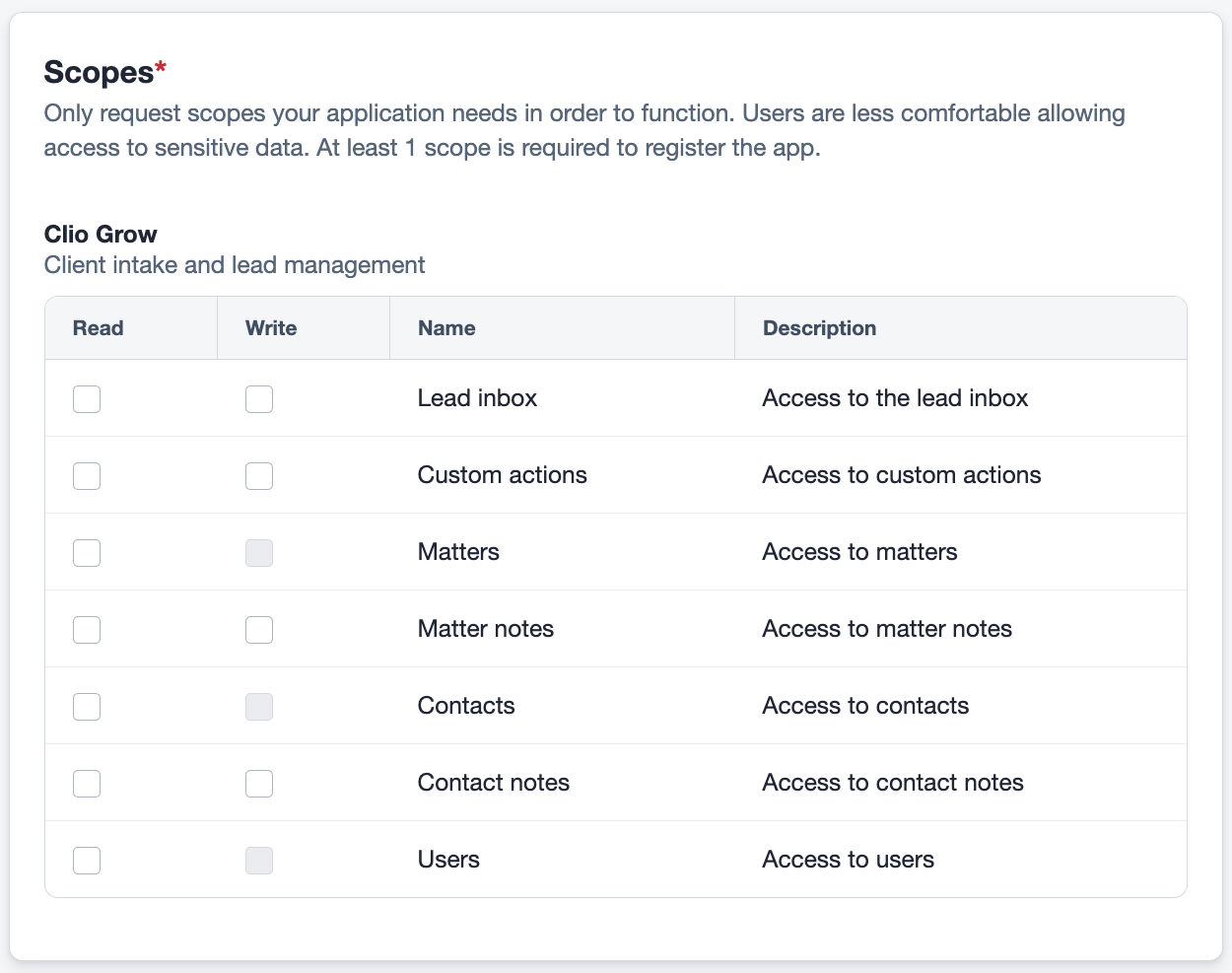
Permissions are divided into read and write options. Read access allows you to read records for that resource by making GET requests, while write access allows you to create, update, and/or delete records for that resource via POST, PATCH, and DELETE requests. Note that not all endpoints support all methods; see the API reference for more information on each endpoint's supported methods.
For example, read access to Matters allows you to perform GET requests to retrieve matters, whether to get a list of matters or get detailed information about a specific matter. Write access to Matter Notes allows you to create, update, or delete matter notes via POST, PATCH, and DELETE requests.
During the first step of OAuth authorization, you must include the scopes your application is requesting as a query parameter. If you request a scope that is not included in your application's settings, the user will not be able to authorize your application. When a user enters the authorization flow, they are presented with the list of permissions that your app has requested, which they must accept before an authorization code is generated and sent to your app.
Available Scopes
The following scopes are available for use with the Clio Platform API:
| Scope | Description |
|---|---|
grow_lead_inbox_write | Write Inbox Leads |
grow_lead_inbox_read | Read Inbox Leads |
grow_custom_action_write | Write Custom Actions |
grow_custom_action_read | Read Custom Actions |
grow_matter_read | Read Matters |
grow_matter_note_write | Write Matter Notes |
grow_matter_note_read | Read Matter Notes |
grow_contact_read | Read Contacts |
grow_contact_note_write | Write Contact Notes |
grow_contact_note_read | Read Contact Notes |
grow_user_read | Read Users |
Changing Permissions
You may change your application's permissions at any time. However, once a user has authorized your application, their permissions are fixed, even if their token is refreshed. If you change permissions in your application settings, you'll need to prompt your users to reauthorize your application to generate new access and refresh tokens that will allow your app to access to the newly requested scopes.
Missing Permissions
If you try to access an endpoint without the necessary permissions, The API will return a 403 Forbidden response. The body of the response will contain an error object with some information about the error, like so:
{
  "error": {
    "type": "ForbiddenError",
    "message": "User is forbidden from taking that action"
  }
}